Selected projects

Research software · Causal modeling

Flow-CLDLoopy-v2

From causal diagrams to
inspectable experiments.

Simulation software for defining assumptions, exploring feedback, and keeping model behavior open to inspection.

My role
Research Assistant
& Lead Developer
Research context
Northeastern University
Collaboration with Aalto University
Built with
Python / NumPy / FastAPI / React

A model, examined four ways.

An illustrative banking loop connects assumptions, dynamics, and feedback.

Explore the live workspace (opens in a new tab)
Illustrative model · Computed example, separate from the research results
Notes on the modeling approach

An interactive three-variable deviation model. Plots show deviations from equilibrium, not bank balances. The 3D parameter space varies retention, edge decay, and edge delay across 125 configurations, with a linked 2D slice. Colors show response behavior, with an additional stability check for runaway growth. The banking research results are separate.

Connect a relationship to its assumptions

Canvas and Tables are two views of the same model. Select a node to connect its place in the network with its numerical settings.

My contribution. I worked on model editing, validation, and the signed-graph simulation kernel.

See what a delay changes

Compare edge delays of zero and six model steps, or overlay both. The shared scale shows ΔCapital, ΔLending, and ΔLosses relative to equilibrium. Zero is the reference level; negative values lie below it.

My contribution. I wrote or modified the historical simulation kernel, including the separation of deterministic edge effects from uncertainty exploration.

Explore three parameters together

Rotate the 3D view or select an exact retention, decay, and delay combination. Switch to a 2D slice to compare settings at one decay value. Blue is Over-damped, neutral is Optimal, and red is Unconstrained. Selecting a configuration updates its response below.

My contribution. I developed tools for parameter exploration, trajectory inspection, and graph diagnostics.

Read the reasoning behind a link

Select a relationship to inspect its sign and example explanation. The balancing loop connects the three variables; the live workspace extends this idea with feedback analysis and edge evidence.

My contribution. My work includes graph diagnostics, inspectable experiment workflows, and platform integration.

Engineering the workflow

I led development of software that turns a causal-loop diagram into a configurable simulation and an inspectable experiment. My contributions span the Python simulation kernel, model-editing and API workflows, and tools for comparing and saving model behavior.

Simulation engine

Worked on the signed-graph kernel, including delayed effects, decay, node retention, bounds, and a separate path for uncertainty.

Experiment tools

Developed workflows for parameter exploration, trajectory inspection, graph diagnostics, and structured result exports.

Platform integration

Led Python/FastAPI and React development connecting model editing, validation, background jobs, and traceable outputs.

Technical workflow

Inside the workflow

Follow one model into an experiment

A diagram describes relationships. To simulate it, those relationships need explicit rules, parameters, and outputs that a researcher can inspect. Select a stage to explore the workflow.

Stage 1 of 4

Make the graph’s assumptions explicit

Nodes carry initial values, retention, and bounds. Edges carry a signed relationship, decay, delay, and confidence. The editor makes these choices inspectable instead of leaving them implicit in a drawing.

Input
A causal diagram and model assumptions
Output
Node and edge definitions

My work hereI worked on the model-editing and validation workflow that connects a researcher’s graph to executable inputs.

Stage 2 of 4

Apply the same update rules over time

The kernel propagates signed effects with delays and decay, updates node states, and applies retention and bound checks during node updates. Deterministic effect strength and uncertainty are handled separately.

Input
The graph, parameters, and initial state
Output
A time path for each node

My work hereThe historical kernel includes code I wrote or modified. Its treatment of edge effects and uncertainty is explained below.

Stage 3 of 4

Look beyond a single simulation

Researchers can inspect individual trajectories, compare parameter settings, and examine sensitivity and behavior classifications. An uncertainty workflow perturbs relationships and runs the deterministic kernel repeatedly.

Input
Baseline runs and parameter variants
Output
Trajectories, diagnostic plots, and comparison tables

My work hereI developed simulation and experiment tools that make model behavior easier to examine and compare.

Stage 4 of 4

Keep assumptions close to the output

The recovered workflow exports model settings, parameter maps, and metrics. In the platform, job-state tracking and versioned run manifests support the path from submitted input to inspectable output.

Input
A configuration and its results
Output
Saved settings and structured results

My work hereI worked on reproducible workflows, result exports, API validation, and background simulation jobs.

An explanatory map combining the recovered notebook workflow with the platform work described in my CV. The notebook screenshots below show the research interface, not the React application.

Making the assumptions visible

Flow-CLD brings model editing, simulation, and analysis into one workspace. Canvas and Tables are synchronized views of the same model: node settings expose starting values, retention, and bounds; edge settings expose correlation, decay, confidence, and delay.

Time-series and fan-chart views sit alongside parameter maps and structural analysis. Evidence records connect a pair of variables with a polarity, strength, and justification, keeping the assumptions behind a relationship available for inspection.

Open the Flow-CLD workspace

The interactive example uses a three-variable deviation model. Its 3D parameter space explores retention, edge decay, and edge delay, with a linked 2D slice and response preview. Plotted values are measured relative to equilibrium. Blue means Over-damped, neutral Optimal, and red Unconstrained, with a stability check for runaway growth. These colors show behavior; the live workspace also has a separate composite-score ranking. The original figures below document the banking research software and its saved outputs.

Original research figures & implementation

From a drawing to explicit assumptions

The banking research starts with relationships elicited from supervisors: how one variable influences another, and how those influences feed back over time. A causal diagram makes those relationships visible. Running it also requires explicit rules for starting values, persistence, delays, and limits.

I worked on the software layer that makes these assumptions editable and executable. The source presentation shows the notebook interface below. A node defines a variable’s state; an edge defines how one variable acts on another.
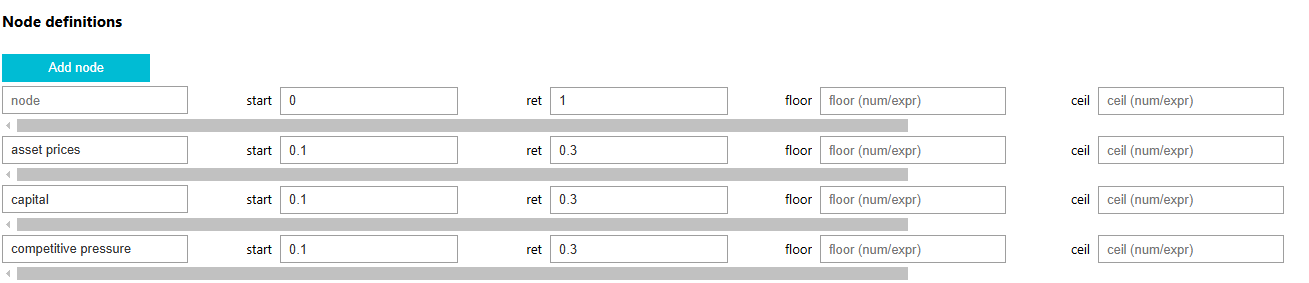

Original notebook node editor, showing asset prices, capital and competitive pressure with start values, retention, floor and ceiling fields.
Defining the state of each node.From the regional-banking presentation by Mikhail Oet, Chenxu Zhang, and Sahil Shah, slide 5. The original interface exposes initial values, retention, and lower and upper bounds.
Original notebook edge editor with source, target, correlation, decay, confidence and delay controls.
Defining the relationships between nodes.Original interface image from the same presentation, slide 6. These are research-notebook screenshots, separate from the React platform interface.

Keeping effect strength separate from uncertainty

One concrete part of the historical simulation kernel I wrote or modified is the treatment of an edge’s modeled effect. The deterministic update combines its signed correlation with decay. Confidence is handled by a separate perturbation workflow that repeatedly calls the deterministic engine.

Baseline behavior

What follows from the stated relationships and settings?

edge transfer factor = correlation × (1 − decay)

This factor multiplies the delayed source value. Retention and bound checks shape the receiving node's update.

Uncertainty exploration

How do paths vary when the assumed relationships are perturbed?

perturb relationships → run kernel → collect paths

Confidence enters this separate path. Lower confidence does not simply become a weaker relationship in the deterministic baseline.

This distinction matters when interpreting a model: changing the strength of a relationship and expressing uncertainty about that relationship ask different questions. Keeping them separate makes the assumptions behind a run easier to inspect.

Reading a saved diagnostic output

The workflow saves more than a final value. The original capital diagnostic below places a trajectory, a rolling standardized score, and a fan-chart view together. It gives a researcher several ways to inspect the same modeled variable.
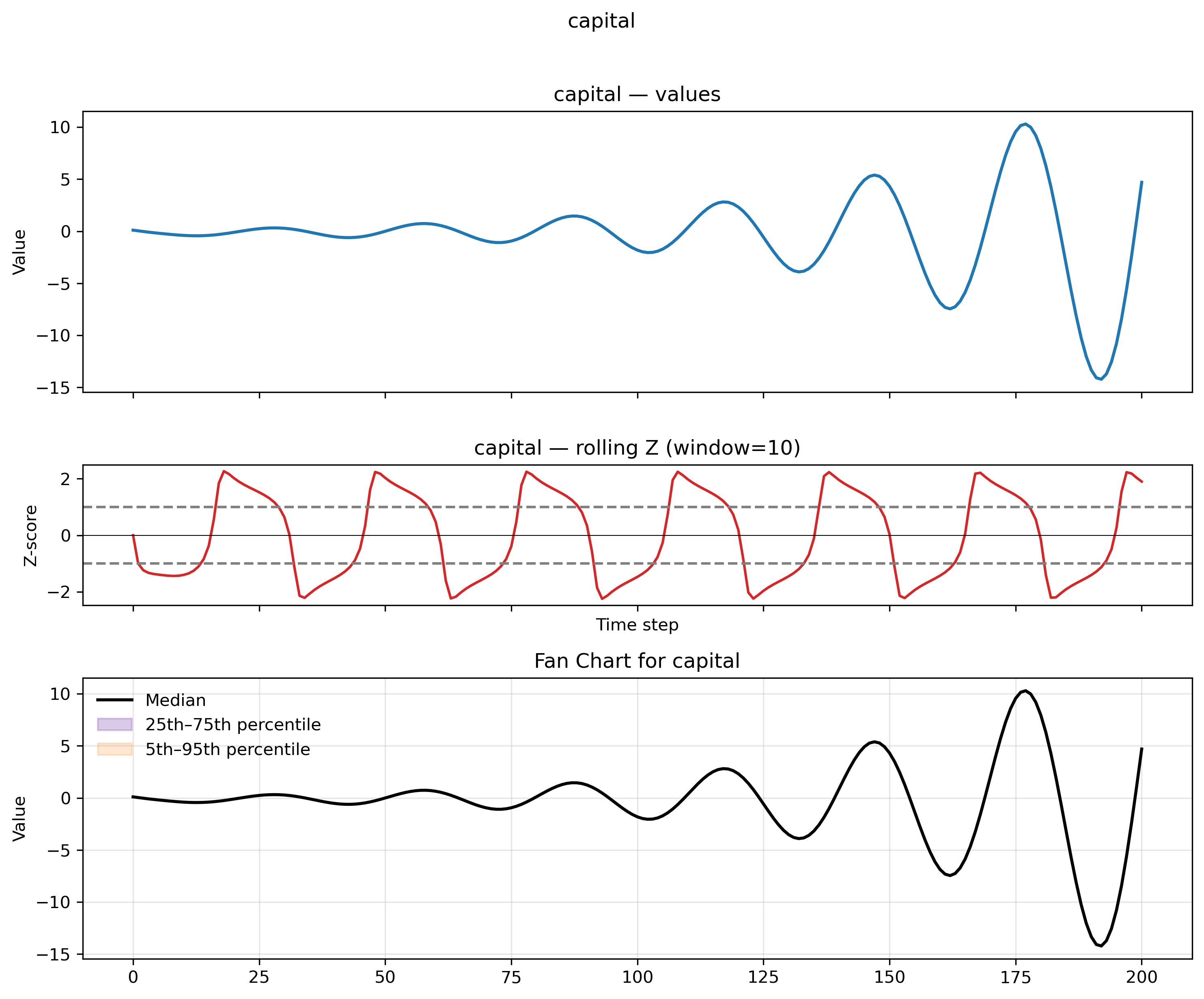
Saved capital-model diagnostic with an oscillating time path, a rolling Z-score with window 10, and a fan chart whose bands closely overlap the median in this artifact.
Saved exploratory output from the research workflow.Original capital diagnostic from the project materials. These are simulated model values, not observed bank data or a validated forecast. The percentile bands closely overlap in this saved view.
Trajectory
Shows the variable's modeled evolution over time. Here, the oscillation grows in amplitude.
Rolling Z-score
Shows values relative to a moving window. This panel uses a window of ten time steps.
Fan chart
Summarizes the collected paths with a median and percentile bands. The legend alone does not establish a wide spread.

Making experiments inspectable

My platform work connected the simulation engine to model editing, validated API inputs, background jobs, and result exports. This gives the research workflow a path from a submitted graph to a run that can be inspected after processing finishes.

The recovered materials include parameter maps, configuration snapshots, and diagnostic tables. They make concrete why retaining settings beside outputs matters: a plot is easier to interpret when its model assumptions and run configuration are available. The platform work also included job-state tracking, structured errors, and versioned run manifests.

I developed simulation software, replication materials, and tutorials supporting the regional-banking research with Mikhail Oet and Sahil Shah. The scientific model and its findings are collaborative work; the software workflow above explains my engineering contribution.

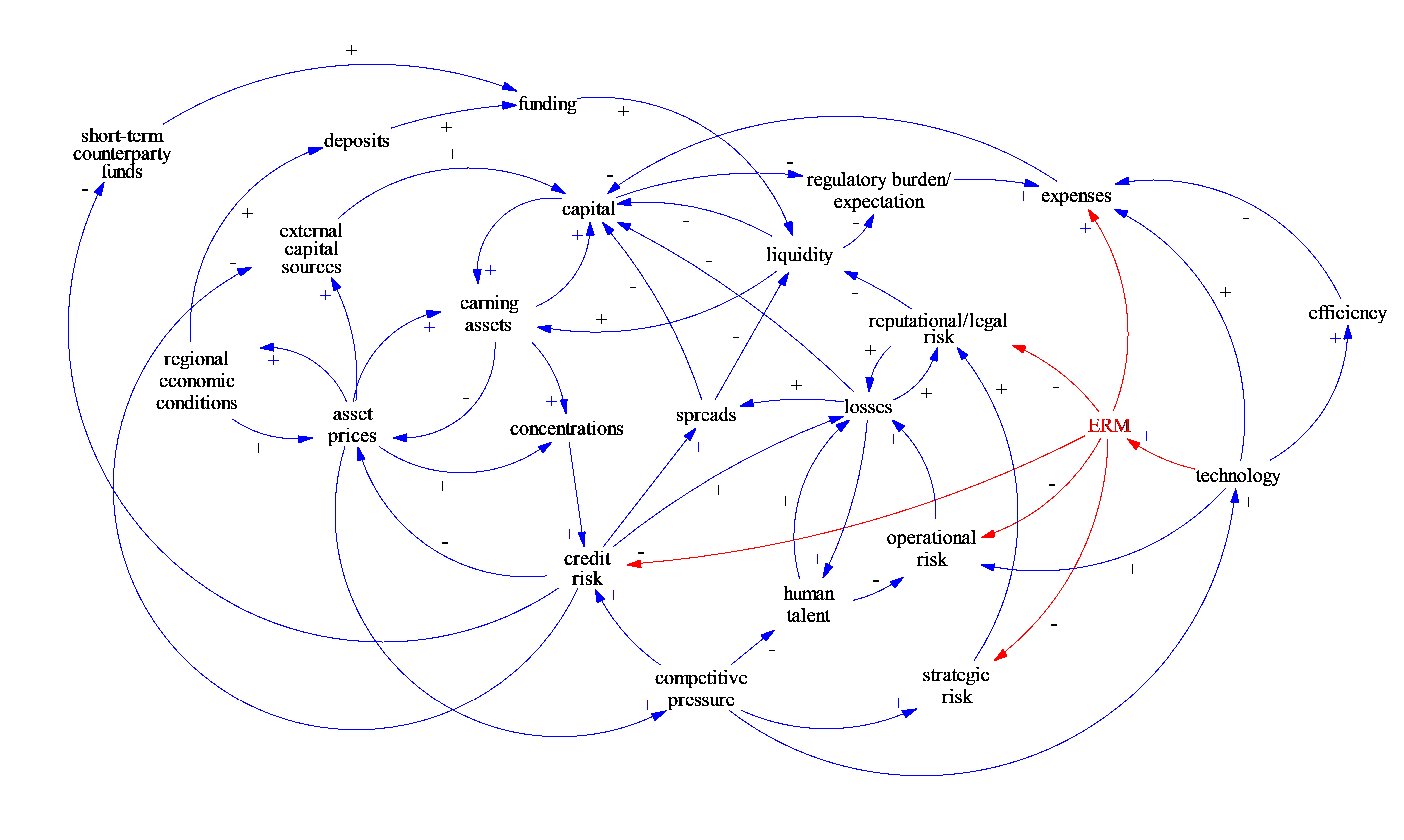
Signed causal network linking banking variables including capital, liquidity, credit risk and losses, with positive and negative feedback links.
The collaborative research context.The regional-banking network. Oet & Zhang, When Supervisors Expect Collapse, Fig. 1.View full-size figure (opens in a new tab)

Let’s connect.

Research figure